• Skip to main content
  • Skip to primary sidebar

JKCrypto

How To Mine Bulwark : $10/Day/1080 TI

January 3, 2020 by Anuj Saini 55 Comments

Hey Cryptominers What’s up. JKCrypto comes up with a new mining guide. In this article you will get to know about how to start mining Bulwark, BWK best mining pool and stable overclock settings and best mining software. Bulwark is launched recently and it is one of the most profitable coins to mine right now.

I have shared about mining Bulwark on Telegram Group some days ago when rewards were $15/Day/1080 Ti. I hope you were one of the early Bulwark miners. If not, BWK  mining is still profitable and will give you about $10-$15/Day/1080 Ti. Right now the difficulty is doubled, so the reward is reduced but price is stable around $11/BWK. Check this post for GTX 1080 ti mining.

Want to buy a new graphics card for mining check this post to know best mining graphics card.
Brief Intro About Bulwark Coin : BWK

Coin Ticker : BWK

BWK Mining Pool : http://bsod.pw/, yiimp.masterhash.us

Bulwark Exchange : Cryptopia , coinsmarkets ( mostly offline these days), stocks.exchange

BWK Miners : palginpav ccminer

BWK Mining Algo : nist5

Block Reward : 40 Bulwark

Masternode Collateral : 5000

Block Time : 60 Seconds

Like Zcoin Bulwark is a privacy coin which will implement privacy zerocoin protocol very soon.In cryptos we have seen acraze for Masternodes and POS, both of these features are implemented in Bulwark.Once POW ends there is seesaw based rewarding system between Staking and Masternodes. For more information check BWK official website.Here my main focus is on Bulwark mining.

For POW Bulwark uses Nist5 algo which is ASIC’s resistant.

Bulwark Wallet

Wallet is used for storing/sending/receiving coins. BWK has many wallets available, check them below.

Windows / Linux Bulwark Wallet

Guide : How to Mine Bulwark, BWK 

1. Download the Miner from links given below.

Nvidia GPU Miners: palginmod ccminer ( 93 mH/s for GTX 1080 ti )

AMD GPU Miners: Sgminer

2. Download the BWK wallet from above link.

3. Generate BWK receving address in wallet.

I have Nvidia GTX 1080 TI and using palginpav ccminer , if you are using any other miner make changes accordingly

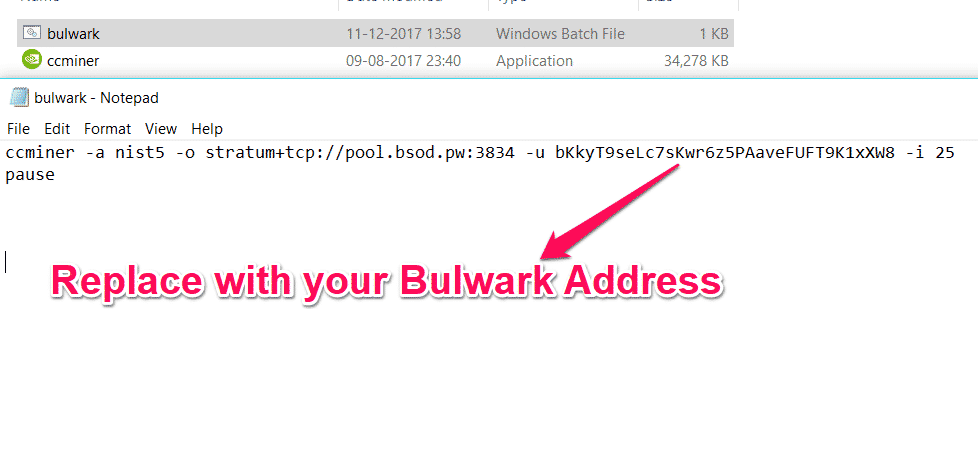
4. Open Bulwark.bat file( right-click and edit)

5. Add following to the bat file and replace it accordingly.

ccminer -a nist5 -o stratum+tcp://pool.bsod.pw:3834 -u bLaLK pause

6. Replace BWK address in above with your BWK address, step 2. Check image below for reference
mine bulwark

7. That’s it, run Bulwark.bat and mining will start instantly.

To check mining stats visit bsod.pw , then wallet and enter your address.

My Mining Experience with BWK 

13-Dec-2017.

I have 7 X GTX 1080 Ti. Two days ago I mined 20 BWK  and sold them for $6 each. That was $17/Day/1080 ti.

My rig hashrate is 650 mH/s. So 93 mH/s for each GTX 1080 ti.

Bulwark Mining Profitability

Today 13 December 2017, BWK mining is giving $6/Day/1080 Ti.

Price is fluctuating so it can be $5 or $10.

Bulwark Mining Performance

Each Nvidia GTX 1080 Ti will give you around 90 Mh/s and 1.5 Bulwark/Day.

If you own any other mining gpu they you can share your gpu hashrate in comments below.

Some Frequently Asked Questions

What is the Best GPU to Mine BWK ?

Nvidia GTX 1080 Ti, GTX 1070 Ti.

Should I Invest in BWK?

No. I don’t recommend it right now. But if you are a crypto miner then why not make some money from BWK mining.

I am not holding any BWK, dumping everyday mined Bulwark

Which Miner do I Use ?

palginpav ccminer for nvidia gpu, download link given above.

Which Pool Do I Use For Mining ?

I use BSOD pool.

How do I edit Bulwark miner .bat file?

already mentioned in the post above, check it.

Where  can I trade Buy/Sell BWK ?

Currently BWK is listed on cryptopia.

What is the Best Overclock Setting For Bulwark Mining ?

These are the minimum stable OC settings which will work on most of the Nvidia GPU’s.

tdp : 100%

core : +75

memory : 0

We hope you liked our article about how to mine Bulwark. To appreciate my work you can give this article a social media share.

Anuj Saini

I write about Crypto mining, trading, referral programs. I have been in the cryptocurrency industry for the last 4 years.

Filed Under: Mining Tagged With: altcoin mining, best coin to mine, bulwark, bulwark mining, bwk, bwk mining, ccminer, gpu mining, how to mine, miner download, mining, mining guide, mining profitability, nist5 algo miner, nvidia mining, overclock settings, palginpav ccminer, tutorial

Reader Interactions

Comments

  1. MyThghtsRmyOwn says

    January 3, 2018 at 1:33 pm

    The download link for the Nvidia miner is infected with a keylogger or trojan according to AVG. It is infected with Win32:BitCoinMiner-GM — Supposedly this is a nasty backdoor for hackers.

    Reply
    • ANUJ SAINI says

      January 3, 2018 at 1:56 pm

      Maximum mining software is detected as virus. It is false positive.
      You can compile the program yourself, binaries at github, but that also will be flagged as virus.

      If you are concerned about keylogger and backdoors, my advice would be to have coin wallet on your main pc and use mining rig for mining only.

      Reply
      • Peter Horsky says

        January 11, 2018 at 3:06 am

        Hi, are you sure that there is no virus in the miner?

        Reply
        • ANUJ SAINI says

          January 11, 2018 at 3:38 am

          Yes.
          If you are concerned then you can compile it manually

          Reply
  2. Divani Furniture says

    January 4, 2018 at 2:07 am

    is there a cpu miner for Bulwark available.
    Thanks

    Reply
    • ANUJ SAINI says

      January 4, 2018 at 1:08 pm

      Check this one https://github.com/tpruvot/cpuminer-multi
      Mining with cpu will not be profitable, but you can always put office computers at work to earn some bucks

      Reply
      • CA RM says

        January 7, 2018 at 12:20 am

        do you think my IT dept. will notice any “strange” activity that would make draw their attention to this? And can you confirm how I could have a couple of PCs at work doing this that is directed to my BWK wallet? Would i just use the same recipient address in the ccminer command line?

        Reply
        • ANUJ SAINI says

          January 7, 2018 at 4:23 am

          System will lag a bit. Yes same address on all the miner.

          Reply
          • CA RM says

            January 8, 2018 at 5:48 am

            thx!

            Do you know why I am only getting 35.5MHs with ccminer and PoolofDeath? I saw somewhere else that maybe there is a “limit” in place? Or is there a command I can use in my batch file to help use the GPU more?

  3. akhil kumar says

    January 4, 2018 at 12:27 pm

    How do you sell your mined bulwark on cryptopia?

    Reply
    • Eclipsie says

      January 4, 2018 at 1:04 pm

      Thats a good question, but I would look that up on you tube.

      Reply
    • ANUJ SAINI says

      January 4, 2018 at 1:41 pm

      Not possible for me to tell you this in comments.
      My advice would be to check some youtube video for “how to trade on cryptopia”

      Reply
      • akhil kumar says

        January 4, 2018 at 2:01 pm

        Thank you! will do that.

        Reply
      • akhil kumar says

        January 4, 2018 at 2:02 pm

        Any ideas on how long will it take for bulwark to get deposited? Mine currently shows unconfirmed.

        Reply
        • ANUJ SAINI says

          January 4, 2018 at 2:07 pm

          No idea. Within few hours, never paid attention to this. Sit back and chill no need to worry.

          Reply
      • akhil kumar says

        January 4, 2018 at 2:05 pm

        Just to let you know! I have used your referral for binance account. Cheers!

        Reply
  4. ANUJ SAINI says

    January 4, 2018 at 1:33 pm

    Bwk already on cryptopia which is good exchanges on comparing with coinsexchange,coinsmarkets. Bittrex and Binance I don’t thiink will be listed soon as BWK is very new.
    On setting tdp at 70% getting 78 mh/s.
    No benefit for increasing memory

    Reply
    • spiro houmpavlis says

      January 4, 2018 at 8:15 pm

      Hi Anuj, what is your core settings? I have a Auros Extreme 1080ti and I am only getting 71 mh/s

      Reply
      • ANUJ SAINI says

        January 5, 2018 at 1:49 pm

        Use miner which I shared, overclock settings already shared in the post

        Reply
    • JonMavrick says

      January 13, 2018 at 7:12 am

      BWK is also on stock exchange and you can mine right to the wallet

      Reply
  5. Dora says

    January 4, 2018 at 6:28 pm

    Be aware of high withdraw fee on cryptopia. On LTC withdraw the fee is insane for a small miner with only one 1080ti: 0.02 LTC, meaning most than a half of one day mining!

    Reply
  6. Eric Smith says

    January 5, 2018 at 3:37 am

    Hi,
    I would like to know if what I am doing is optimised.
    I have 2 x 1080ti msi aero and i get : 100 mH/s when i am mining bwk I got 0.68434358 BWK in 14 hours but at the same time, i am also mining ZCL at 2 x 211 Sol / s and i am also mining Ricoin wich is a CPU only mining for my Xeon. What do you think of the result ?
    Is that ok ?
    Thank for your work!

    Reply
    • ANUJ SAINI says

      January 5, 2018 at 1:55 pm

      Yes you are doing great.
      Many other options available also like zero coin, BTX, LUX, ORE.
      Me also dual mine some time, you must be using -d argument to dual mine

      Reply
      • Eric Smith says

        January 15, 2018 at 10:09 pm

        What is -d argument ?

        Reply
        • ANUJ SAINI says

          January 15, 2018 at 11:55 pm

          In batch file use -d argument.
          e.g you have 5 cards and you want to mine GOA with first 2 and ORE with last 3, then in GOA batch file at the end add -d 1,2 and in ORE batch add -d 3,4,5

          Reply
          • Eric Smith says

            January 18, 2018 at 3:17 pm

            Thank you , now I understand 🙂

      • Eric Smith says

        January 15, 2018 at 10:24 pm

        Also, I can’t find any information on LUX, I read you were mining it but how ?
        Thanks for your work. Your site is great!

        Reply
        • ANUJ SAINI says

          January 15, 2018 at 11:54 pm

          https://jkcrypto.com/altcoins-mining-guides/#lux-mining

          Reply
  7. Rambo IX says

    January 5, 2018 at 7:11 pm

    So i set all up like you said and its working fine thanks for that good instruction 🙂
    But sometimes the ccminer.exe just disapears and miner pauses ? I have no idea how to fix this anyone have some ideas ?

    Reply
    • ANUJ SAINI says

      January 5, 2018 at 7:59 pm

      Make sure overclock settings are not messing with miner.
      Install CUDA, c++ redistribute, enough page file size

      Reply
  8. Mario Benčić says

    January 5, 2018 at 10:29 pm

    Hello,

    I try to mine now, 1070 overclocked, 50 MS/s it’s now.

    I have Wallet opened but I see no BWK jet inside… Do I need to pull it from somewhere or it will be showed automaticly when is made?

    Thank you!

    Reply
    • ANUJ SAINI says

      January 5, 2018 at 11:44 pm

      Wait for some time. You will get it once mined BWK got confirmed

      Reply
      • Mario Benčić says

        January 6, 2018 at 11:49 pm

        I got it… Do I need to have wallet opened all the time or?

        Reply
        • ANUJ SAINI says

          January 7, 2018 at 4:18 am

          No. It will sync automatically once you opened

          Reply
    • CA RM says

      January 7, 2018 at 12:17 am

      Hey Mario, i’ve also got a 1070 but am only at 35 MHs, can you share your settings?

      Reply
      • Mario Benčić says

        January 7, 2018 at 12:20 am

        Temp. Limit: 85
        Core Ckicj: +75
        Memory Clock: +300

        Reply
        • CA RM says

          January 7, 2018 at 12:32 am

          thx! what pool are you working with?

          Reply
  9. ANUJ SAINI says

    January 5, 2018 at 11:42 pm

    Thanks for your BWK mining donation

    Reply
  10. Leo Fernandes says

    January 6, 2018 at 3:28 am

    since the pool payment is made every 2 hours, can I mine directly to Cryptopia?

    Reply
    • ANUJ SAINI says

      January 6, 2018 at 12:42 pm

      No. Exchanges don’t like small mining deposits, they might lock your account, better to mine on wallet then transfer amount to the pool

      Reply
  11. Mario Benčić says

    January 7, 2018 at 4:44 pm

    What do you all think about BWK future? Will price go up?

    Reply
    • ANUJ SAINI says

      January 7, 2018 at 6:11 pm

      Generally during initial days of coin price tends to go up. I am not holding BWK I mine and sell immediately.
      Invest in those coin in which you believe in .

      Reply
      • Mario Benčić says

        January 7, 2018 at 9:22 pm

        Sell for what?

        Reply
        • ANUJ SAINI says

          January 8, 2018 at 12:34 am

          So many exchanges for XRP Binance and Bittrex.
          If you want to invest in alt STRAT my long term hold

          Reply
          • Mario Benčić says

            January 8, 2018 at 1:10 am

            Sorry, I did not understand “If you want to invest in alt STRAT my long term hold”

            Can you explain?

          • ANUJ SAINI says

            January 8, 2018 at 1:21 am

            You were considering ripple to invest my advice to you invest in Stratis, STRAT. I think STARAT price will increase as two ICO’s coming at Stratis platform, very strong development team and so many platform upgrades in 2018.
            This is what I think and do your own research before investing.

          • Mario Benčić says

            January 12, 2018 at 12:31 am

            OK!

            I go on a trip for 10 days… Is there some script wich can restrat mining if somethig happends?

            Thanks!

          • ANUJ SAINI says

            January 12, 2018 at 2:03 am

            https://jkcrypto.com/category/mining/monitoring/

  12. jeremyofmany says

    January 7, 2018 at 10:59 pm

    I have 86 MH/s with a stock EVGA 1080 Ti FTW3. 71C. I have not OCed. 100% Power, 0 GPU/MEM Offset. No paging file. Windows 7.
    Any recommendations for Precision XOC to get 93 MH/s?

    Reply
    • ANUJ SAINI says

      January 8, 2018 at 12:39 am

      hashrate depends on card variant, my zotac provide 93 mh/s and auros extreme 89 mh/s.
      Use MSI afterburner for overclocking and set core to 50 or more to have better speed

      Reply
  13. Raphael Ramos says

    February 12, 2018 at 1:12 pm

    Any updates on mining BWK?
    Is it still profitable or there’s a new kid on the block?
    I’m getting around 142Mhs with 2x 1080ti’s.

    Reply
    • ANUJ SAINI says

      February 12, 2018 at 3:12 pm

      No, not more profitable anymore.
      Mine other coins which I shared

      Reply
      • Raphael Ramos says

        February 12, 2018 at 3:25 pm

        I just got my first transfer… I’m getting around $6 per card. Which other coin is making more than this?

        Reply
  14. Jérémie Simonet says

    February 13, 2018 at 10:29 pm

    Hi. Thanks for the guidelines. I believe I have been mining to your wallet recently (Dumb). Would not mind if you took some of the coins as donation. But can you send some of them to bUnWd7Mq2ZQgfrXsHqkM4dEmxTM6gFUmnE my address if possible thx.

    Reply
    • ANUJ SAINI says

      February 14, 2018 at 2:11 am

      Hi, sorry to hear that. Just checked my wallet now and the address which I shared here is not mine. Sometime I put the wallet address of person who share the coin with me first. I have stopped mining it long time ago so don’t remember whose wallet is this. https://uploads.disquscdn.com/images/d5e7c5f5c2db54c595ec676787f27311a06f97d5addfa1347b572a0e048faff4.png

      Reply

Leave a Reply Cancel reply

Your email address will not be published. Required fields are marked *

Primary Sidebar

Search

Recent

  • Binance Futures Referral Code: JKCRYPTO, Free $500 Welcome Bonus
  • AAX Referral Code: WNvPmcxA2Qo6, Earn 40% Referral Commission
  • OKEx Referral Program : $10 On Signup + Referral Bonus
  • FTX Referral Program : 30% referral commission + 5% fee Discount for Referrals
  • Binance Referral Code: 10186109, 25% Discount

More to See

Binance Futures New Users

Binance Futures Referral Code: JKCRYPTO, Free $500 Welcome Bonus

AAX Referral Code: WNvPmcxA2Qo6, Earn 40% Referral Commission

okex exchange

OKEx Referral Program : $10 On Signup + Referral Bonus

FTX Feature Image

FTX Referral Program : 30% referral commission + 5% fee Discount for Referrals

Bitcoin, Altcoins, Referral Codes, Mining, Crypto News