• Skip to main content
  • Skip to primary sidebar

JKCrypto

How to Mine BTX : Bitcore Mining, $10/day/1080 ti

January 15, 2020 by Anuj Saini 49 Comments

Hi everyone today you will learn about one  of the most profitable altcoin to mine right now. If you own any Nvidia GPU then lucky you as you will be making more dollars by mining BTX. Get to know about how to mine bitcore , BTX mining , best pool, exchange, algo , miner, overclock settings for bitcore mining.

Bitcore was formed by taking snapshot of Bitcoin Blockchain hence has many similarities with bitcoin. Unlike BTC’s ASIC mining, BTX  is ASIC resistant and mined with GPU using Timetravel10 POW algorithm.

BTX Mining Pool : Suprnova , bitcorepool

Bitore Exchange : Bit-Z , Cryptopia

Bitcore Miners : Ccminer , Cgminer, Spmod (download links below)

Bitcore Explorer : explorer.bitcore.cc

BTX Mining Algo : Timetravel10

Max Coin Supply : 21 Billion

Current Mining Rewards : 3.13 coins/ Block

Current Block Size :20 MB Blocksize (10 MB + 10 MB Segwit)  every 2.5 minutes.

Established Since : April 2017

Maximum transactions/ Day : 48 million
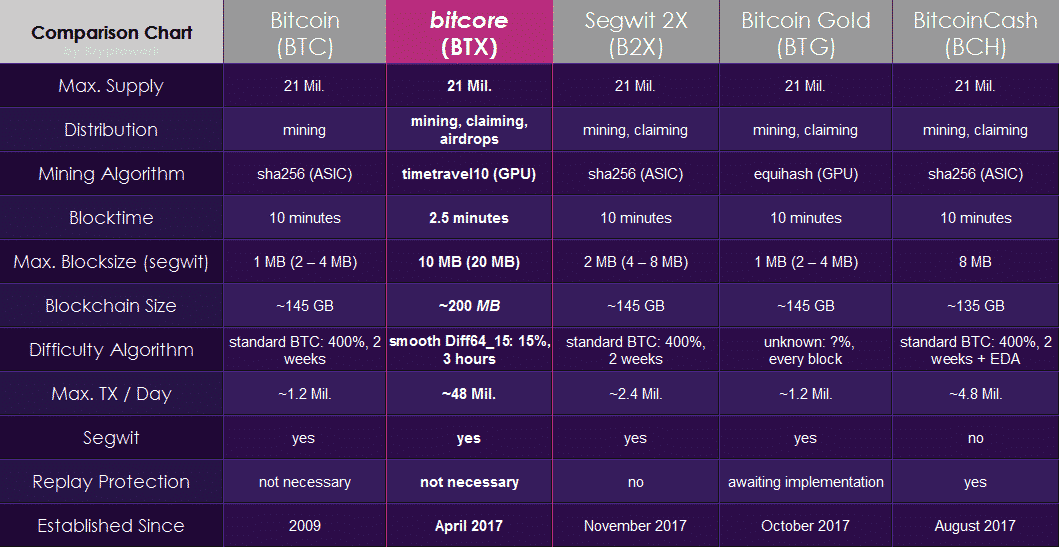
What is Special in Bitcore : BTX

  • BTX uses Bitcoin technology
  • Bitcoin have 1 MB blocksize whereas BTX have 10 MB blocksize which means faster transactions.
  • Bitcoin ASICs mining has become centralised which is not good for a decentralised cryptocurrency. Bitcore is ASIC resistant and uses Timetravel10 algo.

Know Best AltCoin to Mine With GTX 1080 Ti

Bitcore Wallet

Wallet is used for storing/sending/receiving coins. BTX has many wallets available, check them below.

BTX has a Desktop Wallet availabe for Windows,Linux, OSX.

You can also access BTX Mobile Wallet .

Offline Paper/Cold Wallet – Bitcore-paper

Guide : How to Mine Bitcore , BTX 

1. Download the Miner from links given below.

Nvidia GPU Miners: Ccminer 2.2.2   Linux Miner

BTX Fast Nvidia GPU Miner : SPmod2 ( Check featured comment)

AMD GPU Miners: Sgminer ( not profitable to mine with AMD graphics card)

CPUMiner : Downlolad Here (CPU must have AVX instruction set)

2.  Visit BTX  Suprnova

3. Create new account or sign in.

4. Go to My Account >> My Workers >> Add New Worker ( remember worker name for later use)
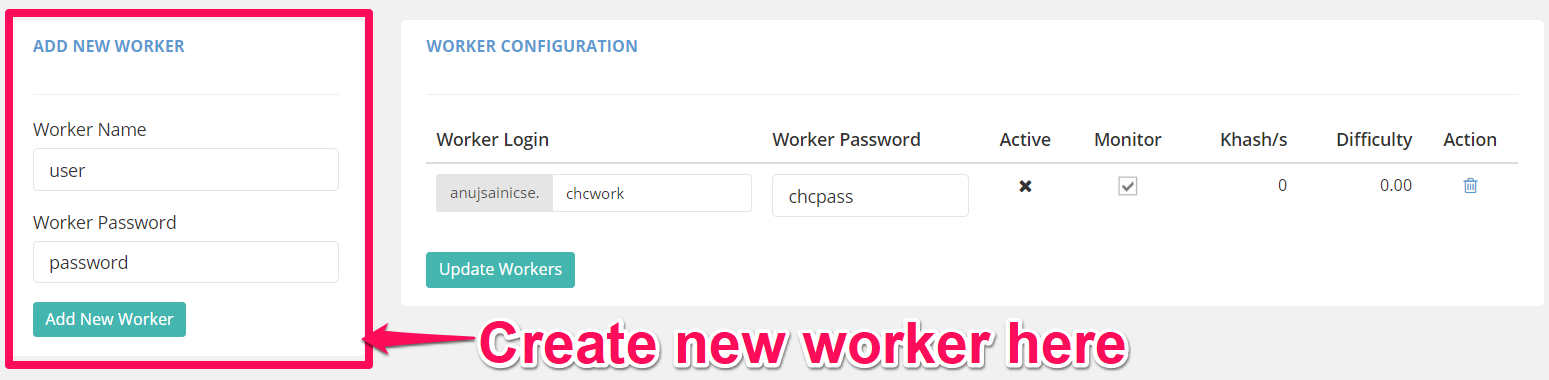
mine btcz

I have Nvidia GTX 1080 TI and using spmod2  Miner, if you are using any other miner make changes accordingly. 

5. Open test.bat file( right-click and edit)

6. Add following to the bat file and replace it accordingly. See images below for help.

7. That’s it, run test.bat and mining will start instantly.

miner –server BTX.suprnova.cc –user anujsainicse.chcwork –pass chcpass –port 5586
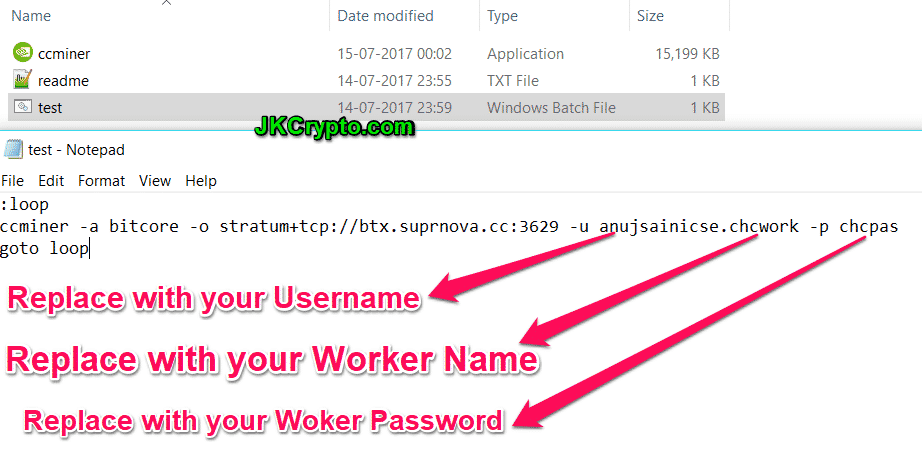
how to mine bitcore

My Mining Experience with Bitcore Mining 

BTX price now $35, 0.00450 BTC

I have 7 X GTX 1080 Ti.

Day before yesterday I had mined 2 BTX with them.

Yesterday I had mined 1 BTX.

BTX price is pumped recently so everyone has started mining it. Two days ago difficulty was around 4,000 but now it has increased to 11,233. Price is also not stable right now. It is fluctuating between 0.00400 BTC to 0.00500 BTC, so consider mining Bitcore risky. By the way I am mining it right now.

Bitcore Mining Profitability

Today 15 January 2018, BTX mining giving $12/Day/1080 Ti. 

Bitcore Mining Performance

Nvidia GTX 1080 Ti will give you around 33 Mh/second.

If you own any other mining gpu they you can share your gpu hashrate in comments below.

Some Frequently Asked Questions

What is the Best GPU to Mine BTX ?

Nvidia GTX 1080 Ti, GTX 1070 Ti.

Should I Invest in BTX?

Coin is new and price is fluctuating too much. 5 days ago it was $14, now it is $35. I don’t recommend to buy BTX right now, remember golden rule of trading buy low sell high. My advice to all miners will be to sell immediately after mining it.

Which Miner do I Use ?

I am using spmod 2 , download link given above.

Which Pool Do I Use For Mining ?

I use Suprnova, bitcorepool is also good.

How do I edit BTX miner .bat file?

already mentioned in the post above, check it.

Should I Solo Mine or Pool Mine?

If having hashrate at least 1000 Mh/second then solo mine otherwise go for pool mining.

Where  can I trade Buy/Sell BTX ?

Currently BTX is not available on any major crypto exchange yet. As of now you can use

  1. Bit-Z
  2. Cryptopia

What is the Best Overclock Setting For Bitcore Mining ?

These are the minimum stable OC settings which will work on most of the Nvidia GPU’s.

tdp : 80%-100%

core : +50

memory : +300

How to Overclock Nvidia Cards For Mininig  

We hope you liked our article about how to mine Bitcore. Do let us know if we were able to solve your problem related to BTX mining. If yes then do give this article a social media share.

Anuj Saini

I write about Crypto mining, trading, referral programs. I have been in the cryptocurrency industry for the last 4 years.

Filed Under: Mining Tagged With: amd miner, bitcore, bitcore mining, btc hardfork, btx, btx altcoin, btx mining, ccminer, gtx 1060, gtx 1070, gtx 1080, gtx 1080 ti, how to guide, mining, mining guide, mining pool, nvidia miner, solo mining, spmod 2 miner, timetravel10

Reader Interactions

Comments

  1. Kevin Youngsaye says

    November 19, 2017 at 8:48 pm

    Has this ship sailed with the huge diff increase (2x) and the value dumping a bit?

    Reply
    • ANUJ SAINI says

      November 19, 2017 at 9:26 pm

      One week ago difficulty was ~4000 and peak at 12000, currently 8000. Price also down to $30.
      Price also fluctuating.
      Buy now at cryptopia for 0.00340 and sell at Bit-z for 0.00390.

      Reply
      • Kevin Youngsaye says

        November 19, 2017 at 9:45 pm

        are you still mining it regardless with your 1080tis? Do you have an estimated per card earning for today? much appreciated and thabks for the additional info.

        Reply
        • ANUJ SAINI says

          November 19, 2017 at 10:07 pm

          No.
          Currently mining zcoin.
          1.5 xzc/day/7×1080 ti.
          ~$5 per card.
          Don’t sell xzc now as it will be listed to binance very soon, so expect hike in price.

          Reply
  2. Halker Optimized says

    November 20, 2017 at 12:48 pm

    I’m have 1080 rig and 1070 rig myself started to make profit again and loved your tutorial thanks.

    Reply
    • ANUJ SAINI says

      November 20, 2017 at 1:35 pm

      Consider subscribing to telegram groups and channels
      https://jkcrypto.com/subscribe-to-notification/

      Reply
      • Halker Optimized says

        November 20, 2017 at 3:18 pm

        the link is not to a telegram group.

        Reply
        • ANUJ SAINI says

          November 20, 2017 at 8:41 pm

          all links given in that post

          Reply
  3. Tim Baker says

    January 15, 2018 at 9:10 am

    your spmod2 miner registers as a virus?

    Reply
    • Sierra More says

      January 15, 2018 at 10:37 am

      same here – with spmod2 Windows Defender detects Trojan:Win32/Vagger!rfn
      probably safer to use the original ccminer from github

      Reply
    • ANUJ SAINI says

      January 15, 2018 at 1:03 pm

      Maximum miners are flagged as virus if you are not comfortable using this miner then mine with regular ccminer but that also be flagged as virus even if you compile it yourself.

      Reply
    • pink pancser says

      January 15, 2018 at 8:57 pm

      also the file size is bigger than the one one github, do not use it

      Reply
      • ANUJ SAINI says

        January 15, 2018 at 11:47 pm

        Its SP-Mod, got if from friend but can’t confirm is it actual sp-mod or not. This miner gave more hashrate so thought of sharing it with everyone

        Reply
  4. DmX says

    January 15, 2018 at 12:17 pm

    MSI GTX1070 Gaming X 8 Go
    tdp: 80%
    core clock : +100
    memory +500

    I get 21MH/S with spmod2 miner and 18MH/S with klaust 8.19 on windows 10.

    Reply
  5. Crisan Caius says

    January 15, 2018 at 8:39 pm

    Why is it not profitable to mine with AMD GPUs? I’m just curious about the technicalities behind this limitation.

    Reply
    • ANUJ SAINI says

      January 15, 2018 at 11:51 pm

      AMD are very good cards for mining. Right now 1080 ti is best due to its efficiency in mining new altcoins which are popping out frequently. Few months back AMD were best cards to mine because AMD performs great in ETH mining and during that time ETH jumped from $15 to $300.

      Reply
  6. Min Er says

    January 15, 2018 at 8:57 pm

    Why are you not mining LUX?

    Reply
    • ANUJ SAINI says

      January 15, 2018 at 11:53 pm

      Actually me mining one shit coin which is LMN on BSOD. It is bit of gamble, can worth very less.
      LUX,BWK all are good options to mine right now

      Reply
  7. mreza alam says

    January 16, 2018 at 3:45 am

    please reupload spmod2 thnx

    Reply
  8. Krasitsky says

    January 16, 2018 at 8:31 pm

    File does not exist

    Reply
    • ANUJ SAINI says

      January 17, 2018 at 1:21 pm

      Sorry for delay updating links now

      Reply
      • Krasitsky says

        January 17, 2018 at 2:05 pm

        File does not exist on this server

        Reply
        • ANUJ SAINI says

          January 17, 2018 at 4:44 pm

          check pinned comment

          Reply
  9. James LaCroix says

    January 17, 2018 at 6:27 am

    Does CCMINER max out your GPU load? I’m running across 2×1080 and the load is very light… bumped up the core clock speed and memory, stlil only puts out about 16 MH/s and I’ve never come close to a full load.

    What am I missing? Or does it stay this low constantly?

    Reply
    • ANUJ SAINI says

      January 17, 2018 at 1:18 pm

      add following to the batch file

      setx GPU_FORCE_64BIT_PTR 0
      setx GPU_MAX_HEAP_SIZE 100
      setx GPU_USE_SYNC_OBJECTS 1
      setx GPU_MAX_ALLOC_PERCENT 100
      setx GPU_SINGLE_ALLOC_PERCENT 100

      Reply
      • James LaCroix says

        January 17, 2018 at 7:05 pm

        Thanks I actually had that from another site. I did bump up the core clock 100, memory clock 500 and the core voltage up 10, that moved the rate up to around 18 so a decent jump but the 3D/Copy sections of the GPU source still aren’t maxed out. I assume this is normal either way.

        Thanks for the info.

        Reply
  10. Justin A. says

    January 17, 2018 at 8:07 am

    Trying out Bitcore and I’m getting just under 25MH/s, am I not seeing the 33MH/s you were because the difficulty went up so much in one day?

    Reply
    • ANUJ SAINI says

      January 17, 2018 at 1:19 pm

      Regular ccminer will give you less hashrate and miner which I shared is got deleted, updating links now

      Reply
  11. Kelvin Clark says

    January 17, 2018 at 4:38 pm

    Hi, are you any closer to providing the SPmod2 link?
    I’ve had a look and cant find it.

    Reply
    • ANUJ SAINI says

      January 17, 2018 at 4:43 pm

      Checked pinned comment

      Reply
      • Kelvin Clark says

        January 17, 2018 at 5:11 pm

        Thanks, It’s working. Is there any way we can set the GPU usage to only 80%. I get worried that the card will die.. It’s currently at 100% and making me nervous.

        Reply
        • ANUJ SAINI says

          January 18, 2018 at 12:03 am

          No your cards won’t die.
          Mining since 7 months at 100% usage all my cards working fine till date.

          add following to the batch file and make changes accordingly

          setx GPU_FORCE_64BIT_PTR 0
          setx GPU_MAX_HEAP_SIZE 100
          setx GPU_USE_SYNC_OBJECTS 1
          setx GPU_MAX_ALLOC_PERCENT 100
          setx GPU_SINGLE_ALLOC_PERCENT 100

          Reply
  12. disqususer619 says

    January 17, 2018 at 4:51 pm

    Bitcore SP-mod link : http://www52.zippyshare.com/v/gt70TwTX/file.html
    You will get 33mh/s for 1080 ti.
    Got this from my friend and currently using it. Can’t confirm source genuinity if you are not cofirtable then use regular miner but that will give you less hash rate.

    Reply
    • Mark says

      January 26, 2018 at 6:25 pm

      How can I solo mine bitcore wallet locally (I have tried extensively with it won’t connect as the result says the expected “[{ expected near http ” when I am running bitcore-qt -server etc… The miner connects fine to the pool but There seems to be a problem I can’t identify with the config.. Any help?

      Reply
      • ANUJ SAINI says

        January 27, 2018 at 4:54 am

        Do you have enough hash rate for solo mining?
        Never done BTX solo mining , don’t know much about it

        Reply
  13. Carlos E Zambrano says

    January 17, 2018 at 10:11 pm

    asus gtx 1070 strix mining BTX: 21.4 mh/s, tdp 120%, core +99, mem +499, temp 63c. Im using bitcore spmod2 miner.

    Reply
  14. Apophis2036 says

    January 18, 2018 at 8:22 pm

    Hello, what is the power comparison to get 33MH/s on 1080ti?

    Reply
    • ANUJ SAINI says

      January 18, 2018 at 9:27 pm

      Depends on card variant you have.
      Check MSI afterburner power usage graph.

      Reply
  15. TakeshiSatoshi says

    January 19, 2018 at 5:04 am

    Keep getting either MSVCP120.dll is missing and once I added the dll to the folder it says The application is unable to start correctly error

    Reply
    • ANUJ SAINI says

      January 19, 2018 at 12:35 pm

      Which miner you using… spmod?
      Update Nvidia driver,CUDA,C++ redistribute, hope it helps

      Reply
      • TakeshiSatoshi says

        January 21, 2018 at 6:01 am

        Yea I needed to update my drivers thanks 🙂

        Reply
  16. wzyefd says

    January 19, 2018 at 9:37 am

    My 8*1080ti rig will restart when I run sp-mod to mine BTX, even if I reset my Afterburner.
    Any suggestion? It works when mining XZC.

    Reply
    • ANUJ SAINI says

      January 19, 2018 at 12:40 pm

      If rig is restarting without any error that there should be problem with PSU.
      Try lowering tdp in afterburner

      Reply
  17. Maca Bond says

    January 21, 2018 at 7:19 pm

    what is your bit-z referral?

    Reply
    • ANUJ SAINI says

      January 21, 2018 at 11:14 pm

      https://www.bit-z.com/user/signup?pid=1332734&lang=en

      Reply
  18. Ev3rM0r3 says

    January 26, 2018 at 4:48 am

    EVGA 1080 SC gets me average of about 20.03 MH/s. 12 hours converts out to about 1.20$ off 1 card… I don’t think btx is worth it since I can mine $2.50 in a 12 hour period on nicehash. Maybe I’m missing something

    Reply
    • ANUJ SAINI says

      January 26, 2018 at 2:17 pm

      Yes not good anymore.
      Check this post to know best coin to mine right now
      https://jkcrypto.com/coin-to-mine-with-nvidia-gtx-1080-ti/#comment-3726380955

      Reply
  19. Chris Liam Gw says

    February 2, 2018 at 7:33 pm

    10-11 MHS on 980
    I wouldn’t recommend selling, i strongly believe this coin has a bright future, it also pays weekly dividends with airdrop.

    Reply
  20. Erano Magdaluyo says

    February 17, 2018 at 1:02 pm

    Please reupload the spmod2.

    Reply

Leave a Reply Cancel reply

Your email address will not be published. Required fields are marked *

Primary Sidebar

Search

Recent

  • Binance Futures Referral Code: JKCRYPTO, Free $500 Welcome Bonus
  • AAX Referral Code: WNvPmcxA2Qo6, Earn 40% Referral Commission
  • OKEx Referral Program : $10 On Signup + Referral Bonus
  • FTX Referral Program : 30% referral commission + 5% fee Discount for Referrals
  • Binance Referral Code: 10186109, 25% Discount

More to See

Binance Futures New Users

Binance Futures Referral Code: JKCRYPTO, Free $500 Welcome Bonus

AAX Referral Code: WNvPmcxA2Qo6, Earn 40% Referral Commission

okex exchange

OKEx Referral Program : $10 On Signup + Referral Bonus

FTX Feature Image

FTX Referral Program : 30% referral commission + 5% fee Discount for Referrals

Bitcoin, Altcoins, Referral Codes, Mining, Crypto News